
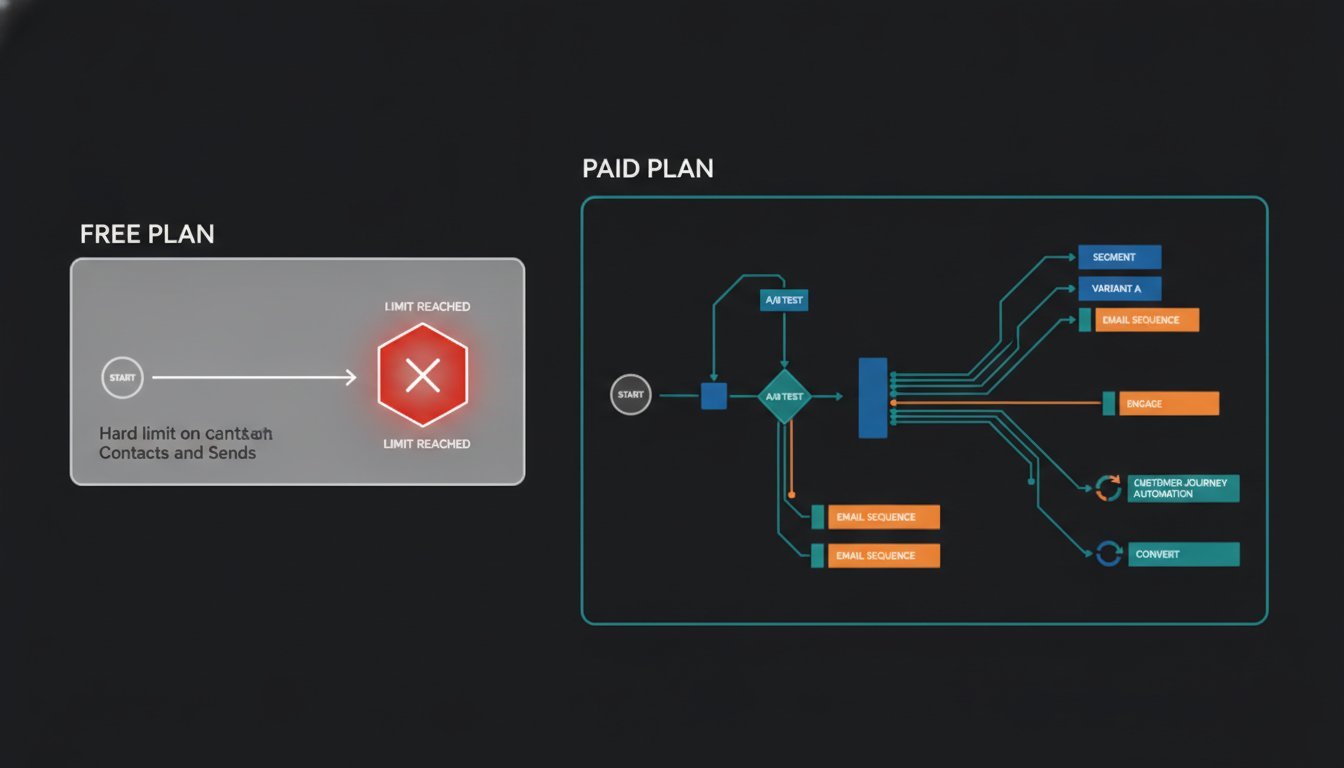
If you’re still treating your email list like a side project, the 250-contact limit is a ceiling you’ll hit before you’ve even launched your first real campaign. Knowing exactly when to upgrade from Mailchimp’s free plan is no longer a matter of preference; it’s a tactical necessity for your 2026 operations. With the monthly send cap now restricted to just 500 emails, most growing brands find themselves paralyzed by a platform that was supposed to help them scale.
We understand that you likely chose the Free plan to keep overhead low while testing your initial marketing ideas. It’s a logical starting point, but the current restrictions on automation and scheduling can quickly turn into a bottleneck for your lead nurturing. This briefing identifies the exact technical and financial triggers that make the Free plan a liability for your growth. I’ll provide a clear checklist for your upgrade timing, explain the ROI of paid features like multi-step automations, and show you how to avoid common migration headaches before they disrupt your workflow.
Key Takeaways
- Identify the “Safety Zone” for your audience size to avoid sudden service interruptions when you cross the 250-contact threshold.
- Learn exactly when to upgrade from Mailchimp’s free plan by calculating the labor tax of manual segmentation against the cost of a subscription.
- Evaluate the ROI of branching logic and multi-step automations for high-value B2B lead nurturing.
- Compare the Standard and Essentials tiers to determine which feature set provides the best operational foundation for your 2026 growth.
- Follow a step-by-step audit to clean your contact list and map your customer journey before you hit the upgrade button.
The Reality of Mailchimp Free in 2026: Why the Ceiling is Lower
The 2026 landscape for email marketing has shifted. If you’re managing a B2B operation, you’ve probably noticed that the “Free” tier feels more like a restricted sandbox than a functional tool. The hard limit of 250 contacts is a barrier that even the smallest startups hit within weeks of active lead generation. Combined with a monthly send cap of just 500 emails, your ability to communicate with your audience is severely throttled. This isn’t just about volume; it’s about reliability. If you send a few test emails and a single weekly blast to your full list, you’ve already exhausted your quota by the middle of the month.
Understanding Mailchimp’s history and features reveals a clear trend toward monetization. What was once a generous entry-level plan is now effectively a trial period for those testing the interface. For a professional looking at when to upgrade from Mailchimp’s free plan, the decision often comes down to when the platform’s limitations start to obstruct your primary business goals. Deciding when to upgrade from Mailchimp’s free plan usually happens the moment you realize your manual workarounds are costing you more in time than the monthly subscription fee.
The Contact Counting Trap
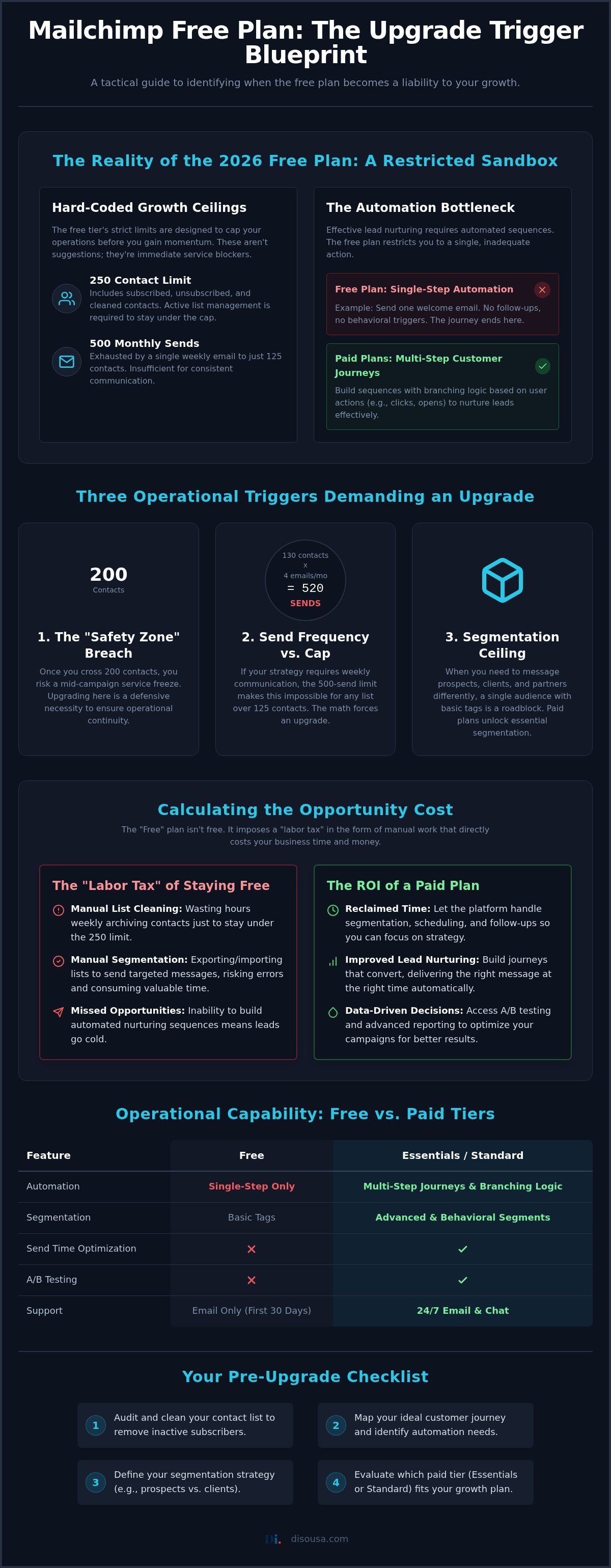
Mailchimp’s billing logic is often a surprise to new users. They don’t just count your active, “Subscribed” contacts. Your “Total Audience” includes unsubscribed and cleaned addresses. If someone opts out of your newsletter, they still occupy one of your 250 slots until you manually archive or delete them. This creates an administrative burden. You’re forced into a cycle of weekly list cleaning just to keep your account functional. Many operations consultants recommend staying in a “Safety Zone” of 200 contacts to avoid hitting the limit during a live launch. If you cross that 250-contact threshold mid-campaign, your sends are blocked immediately. This technical risk is too high for any business relying on consistent outreach to drive revenue or maintain client relationships.
Restricted Multi-Step Automations
The most significant operational liability is the lack of advanced automation. On the Free plan, you’re limited to single-step “Classic” automations. You can send a one-off welcome email, but you can’t build a sequence that responds to user behavior. This is a massive disadvantage for lead nurturing email campaigns. A true customer journey requires branching logic. For example, you might want to send a follow-up case study only if a lead clicked a specific link in your first email. Without these paid features, you’re stuck doing the heavy lifting manually. This manual segmentation takes hours away from high-value tasks, making the “Free” plan an expensive choice in terms of labor costs.
Three Operational Triggers That Demand an Immediate Upgrade
Deciding when to upgrade from Mailchimp’s free plan isn’t just about avoiding an error message. It’s about recognizing when your infrastructure is actively preventing you from closing deals. I’ve identified three specific triggers that signal your current plan has become a liability. The first is the “Safety Zone” breach. While the hard limit is 250, you should look to upgrade once you hit 200 contacts. Crossing this threshold without a buffer risks a total service freeze during a critical campaign. You don’t want to be troubleshooting billing settings while your leads are waiting for a response.
The second trigger is your send frequency. With a 500-email monthly cap, a list of 130 people can only receive three emails a month before you hit the wall. If your strategy requires a weekly newsletter plus automated follow-ups, the math simply doesn’t work. Following email marketing best practices involves consistent touchpoints, which is impossible under these 2026 constraints. Finally, if your audience spans multiple time zones, you need Send Time Optimization. Sending a B2B brief at 3:00 AM your time might mean it’s buried in your prospect’s inbox by the time they start their day.
The Segmentation Ceiling
The Free plan restricts you to a single audience and a handful of tags. For a B2B firm, this is a major roadblock. You likely have prospects, current clients, and past partners who all need different messaging. A generic blast to everyone is a fast track to the spam folder. Implementing a sophisticated email segmentation strategy requires the pre-built segments and behavioral filters found in the Essentials or Standard tiers. If you’re struggling to keep your data organized, it’s time to let the platform do the heavy lifting. You can always consult with a specialist to map out these segments before you commit to a new tier.
A/B Testing and Optimization
If you’re guessing which subject line works best, you’re leaving money on the table. Moving to a paid plan unlocks A/B testing, which often yields a 20% to 30% lift in open rates. This isn’t just about subject lines; it’s about testing “From” names and content layouts to see what resonates. Standard plans even offer multivariate testing. This allows you to test up to three variables at once. In a competitive B2B environment, these incremental gains are what separate a successful campaign from a wasted effort. Data should drive your decisions, not gut feelings. Testing allows you to stop hoping for results and start engineering them.
Calculating the Opportunity Cost of Staying Free
When you’re evaluating when to upgrade from Mailchimp’s free plan, you have to look beyond the monthly subscription cost. The real expense of a free account is the revenue you aren’t making because your tools are basic. If your average customer value is high, losing just one lead to a failed or non-existent automation pays for an entire year of a paid tier. In the B2B world, we don’t just measure software by its price; we measure it by its ability to reclaim our time and secure our pipeline. Staying on a restricted plan often results in a “Labor Tax” where you spend hours each week manually segmenting lists that a paid plan would handle automatically.
There’s also the issue of professional trust. Every email sent on the Free plan includes Mailchimp branding. In a high-stakes B2B environment, that small logo at the bottom signals that you’re still in the “testing” phase of your business. Removing that branding is a small but vital step in establishing the authority needed for enterprise-level contracts. As noted in Forbes Advisor’s 2026 analysis of email marketing software, many of the most critical insights and performance metrics are now locked behind paid tiers, making the upgrade a prerequisite for data-driven decision making.
Automation as a Revenue Multiplier
A single welcome email is a handshake, but a five-part nurture sequence is a full sales conversation. On the Free plan, you’re stuck with that handshake. Paid plans allow for behavior-based triggers, which means you can send specific content based on what a lead actually clicked. This transition from mass blasts to personalized journeys is where your online marketing services strategy becomes a scalable asset. Data shows that automated sequences triggered by specific actions consistently outperform manual broadcasts in terms of Revenue per Email (RPE). If you aren’t using these triggers, you’re effectively leaving money on the table every time you hit send.
Technical Support and Downtime
The Free plan provides email support for only the first 30 days. After that, you’re essentially on your own. If your account gets flagged for a technical glitch or a template breaks during a major launch, you have no direct path to a resolution. For any business focused on performance marketing, this lack of support is an unacceptable risk. Upgrading to a paid tier gives you 24/7 access to assistance, ensuring that a minor technical hurdle doesn’t turn into a multi-day blackout for your outreach efforts. Reliability is a feature you can’t afford to skip when your growth depends on consistent communication.
Migration vs. Upgrade: Is Mailchimp Still the Right Platform?
Once you determine when to upgrade from Mailchimp’s free plan, you must decide whether to move up the tier list or switch platforms entirely. For most B2B operations, the Essentials plan is a temporary fix. It removes the 500-email send limit and branding, but it doesn’t provide the behavioral logic required for high-level conversion. The Standard plan is the actual sweet spot for performance growth. If your internal team is already at capacity, this is often the point where partnering with a professional email marketing agency becomes more cost-effective than managing complex technical transitions alone.
You might consider competitors like Brevo or Klaviyo during this phase. Brevo is often utilized for its transactional email strengths, while Klaviyo remains the standard for e-commerce. However, for a B2B service or affiliate model, the decision to leave Mailchimp involves significant risks. Migration is not just a CSV export. You have to account for existing API integrations, landing page rebuilds, and the loss of your historical engagement data. Before you commit to a new platform, you should calculate the total hours required to rebuild your current infrastructure elsewhere.
The Standard Plan Advantage
The Standard tier introduces the Customer Journey Builder. This tool allows for branching logic that responds to how a lead interacts with your content. You can create different paths for users who opened an email versus those who clicked a specific link. Why “Send Time Optimization” justifies the price jump is simple: it ensures your brief arrives when the recipient is most likely to be at their desk. This is vital for global brands operating across multiple time zones. The plan also includes predictive demographics, which use data-driven modeling to help you refine your audience targeting without manual research.
Evaluating the “Migration Tax”
Switching platforms carries a hidden “Migration Tax” that many businesses overlook. This includes the time spent auditing your current tech stack and the technical risk of deliverability drops. When you move to a new provider, you have to warm up a new IP and domain reputation. This process takes weeks and can result in temporary dips in open rates. If your current Mailchimp setup is already integrated with your CRM, it’s often cheaper to stay and pay for the upgrade than to move and rebuild. You can assess your digital infrastructure to see if your current bottlenecks are platform-specific or strategy-specific.
Next Steps: Executing Your Email Growth Strategy
Once you’ve determined when to upgrade from Mailchimp’s free plan, the focus shifts from justification to execution. You shouldn’t hit the upgrade button until you’ve audited your current audience. Mailchimp charges based on your total contact count, which includes those who have unsubscribed or been “cleaned” due to bounces. Archiving these contacts before you move to a paid tier ensures you don’t pay for data that cannot convert. I recommend setting a 90-day ROI goal for your new features. If your subscription costs $20 a month, your automated sequences or A/B tests should generate at least five times that in reclaimed labor or increased sales performance.
Mapping your ideal customer journey is the most important task before you commit to a higher tier. You need to know exactly what happens after a lead signs up for your newsletter or downloads a white paper. If you don’t have a plan for your branching logic, you’ll end up paying for a “Standard” plan while only using “Essentials” features. This is where we help our clients by scaling digital marketing operations through data-driven systems that remove the guesswork from your outreach.
The 30-Day Transition Checklist
- Step 1: Clean your list. Move all unsubscribed and cleaned contacts to your archive to minimize your billable contact count immediately.
- Step 2: Activate A/B testing. Use your next three campaigns to test subject lines or “From” names to establish a performance baseline.
- Step 3: Build a multi-step sequence. Transition your single welcome email into a 3-part nurture series that provides value before a direct sales pitch.
Leveraging Professional Oversight
Scaling an email list often reveals gaps in your technical foundation. If you’re managing complex funnels, it’s often more efficient to outsource the management to experts who ensure your deliverability remains high. This is especially true when integrating affiliate marketing for brands into your existing lifecycle. My final recommendation is to treat the upgrade as an investment in your strategy, not just a software expense. A tool is only as effective as the customer journey you’ve mapped out behind it. Don’t just pay for the tool; invest in the strategy that makes the tool profitable.
Scaling Your Email Infrastructure for Performance
Transitioning beyond the Free plan is a strategic shift from basic broadcasting to sophisticated revenue generation. You’ve identified that the 250-contact limit and 500-email send cap are rigid boundaries that stifle B2B growth. Deciding when to upgrade from Mailchimp’s free plan depends on when your manual workarounds and lost leads begin to cost more than the subscription itself. By prioritizing multi-step automations and behavior-based segmentation, you transform your email list into a high-performing asset that works for you.
Disousa provides the technical oversight needed to navigate these transitions without the usual migration headaches. We utilize expert automation blueprints and data-driven conversion optimization to ensure your infrastructure scales alongside your ambition. Our transparent B2B growth strategies are designed to reclaim your operational time while securing your sales pipeline. You’ve already built a solid foundation. Now it’s time to build the automated engine that drives your business forward.
Optimize your email operations with Disousa’s professional frameworks.
Frequently Asked Questions
Is Mailchimp free still worth it in 2026?
The Free plan is only viable for individuals testing the interface or businesses with fewer than 200 contacts. With the 2026 send limits reduced to 500 per month, it’s a trial period rather than a long-term growth tool. If you need to send more than one email per week to a small list, the plan’s restrictions will stop your operations. You’ll find it difficult to maintain consistent touchpoints under these constraints.
Do unsubscribed contacts count towards my Mailchimp limit?
Yes, unsubscribed and cleaned contacts count toward your total audience limit. Mailchimp bills based on the total number of contacts in your audience, regardless of their subscription status. You must manually archive or delete these contacts to free up space. This is a critical factor when deciding when to upgrade from Mailchimp’s free plan, as a “dirty” list can force an unnecessary tier jump.
What happens if I exceed my contact limit on the Free plan?
Mailchimp will block all outgoing emails immediately if you exceed the 250-contact limit. You won’t be able to send campaigns or automated welcome emails until you either archive contacts or upgrade to a paid tier. This can cause significant disruptions during a live marketing push. It’s best to maintain a safety buffer of at least 50 contacts to avoid sudden and unexpected service interruptions.
What is the difference between Mailchimp Essentials and Standard plans?
Essentials removes branding and send limits but offers only basic, single-step automation. Standard is the preferred B2B choice because it includes the Customer Journey Builder with branching logic and Send Time Optimization. Standard also provides predictive demographics and multivariate testing. For most operations, the Standard plan provides the necessary tools to actually scale revenue through personalized lead nurturing sequences.
Can I remove the Mailchimp logo on the Free plan?
You cannot remove the Mailchimp logo or branding from your emails on the Free plan. This requirement is a permanent fixture of the entry-level tier. Removing the “Sent from Mailchimp” badge requires an upgrade to at least the Essentials plan. For B2B companies, removing this logo is a small but vital step in establishing professional authority with high-value prospects and partners.
How many emails can I send per month on the Mailchimp Free plan?
You are limited to 500 monthly email sends on the Free plan as of 2026. This total includes both your bulk campaigns and any automated transactional or welcome emails. If you have 250 contacts, you can only message your entire list twice per month. This low ceiling makes it difficult to maintain the consistent engagement required for effective performance marketing and lead retention.
Is there a daily send limit on Mailchimp’s Free tier?
Yes, the Free plan has a daily send limit of 250 emails. This means you cannot blast a larger list all at once even if you’re under your monthly cap. This restriction is designed to prevent spam but often hinders time-sensitive announcements. Knowing when to upgrade from Mailchimp’s free plan often comes down to needing the flexibility to reach your entire audience in a single day without delays.
When should I switch from Mailchimp to a different email provider?
Consider switching if your specific niche requires specialized features like advanced SMS integration or specific e-commerce deep-links that Mailchimp lacks. However, always calculate the “Migration Tax” first. Rebuilding your automations and warming up a new IP often costs more in labor than the price difference between platforms. If your current stack is already integrated, staying and upgrading is usually the more efficient path for your business.
Disclaimer
**Disclosure:** Some articles on this website may contain affiliate links. This means we may earn a commission if you purchase a product or service through certain links, at no additional cost to you. We only recommend products, tools, and services that we believe provide value to our readers.
**Disclaimer:** The information provided on this website is for educational and informational purposes only and should not be considered financial, legal, tax, or professional advice. While we strive to keep our content accurate and up to date, we make no guarantees regarding completeness, reliability, or results obtained from using the information provided. Always conduct your own research and consult qualified professionals before making business, financial, or investment decisions.
