
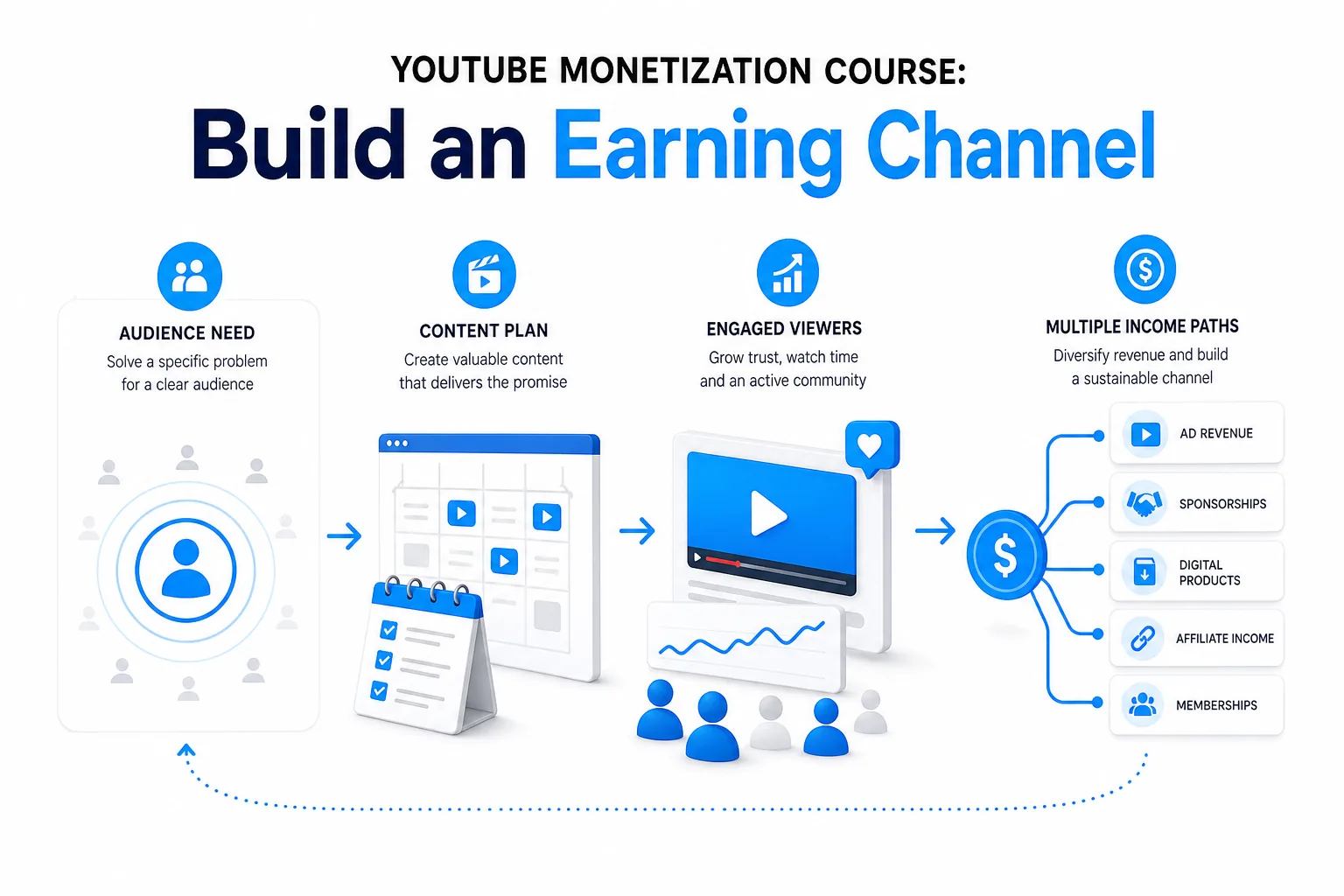
A YouTube monetization course can teach you how to plan videos, qualify for the YouTube Partner Program, and build income beyond ads. The best course for you depends on the task you need to learn next, not a promise of fast cash. I’m Antonio De Sousa, and at DiSousa I focus on the skills and systems behind a lasting online income.
- A course can teach a method, but it can’t guarantee views, YPP approval, or income.
- Check current eligibility requirements before planning around ad revenue.
- Choose one audience promise, then make videos that deliver on it.
- Track each income source separately so you can see which work is paying off.
Step 1: Choose a YouTube monetization course that fits your immediate learning gap
Choose a course based on the next task you need to do, such as planning a channel, improving production, or understanding revenue options. Don’t buy a broad program just because it uses words like “professional” or “complete.” First, write down the one problem you want the course to help solve.
Then check whether the lessons address that problem in a way you can use. A course on monetization should explain more than how to switch on ads. It should help you connect content choices with the available income paths. A monetization course can also help you consider how revenue methods fit your channel goals.
Other programs focus on the wider job of running a channel. YouTube Content Creator Professional covers strategic planning, professional production, data-driven optimization, content strategy, script writing, and video production with a smartphone across 16 courses. The YouTube Masterclass focuses on channel setup and strategy, production on a budget, titles, descriptions, thumbnails, analytics, Shorts, live streams, and monetization methods. Its listed price is $119.99, and it advertises a 30-day money-back guarantee. YouTube Content Creator Professional is included with Coursera Plus. Those are different payment models, so compare the full subscription cost and course fit before enrolling.
- If you’re new: look for lessons on channel focus, video planning, production, and the basic YPP rules.
- If you already publish: seek training on analytics, audience retention, brand deals, or how to connect videos with an offer.
- If your goal is course sales: make sure the material teaches audience research and offer design, not only video views.
Course titles can make similar programs sound very different. Read the lesson outline and check whether you’ll complete work you can apply to your own channel. DiSousa publishes comparisons and marketing education for people who want to connect content with a wider online business. Use that lens when weighing a course: what will you be able to do after each lesson?
Step 2: Check YouTube’s current monetization requirements and channel policies
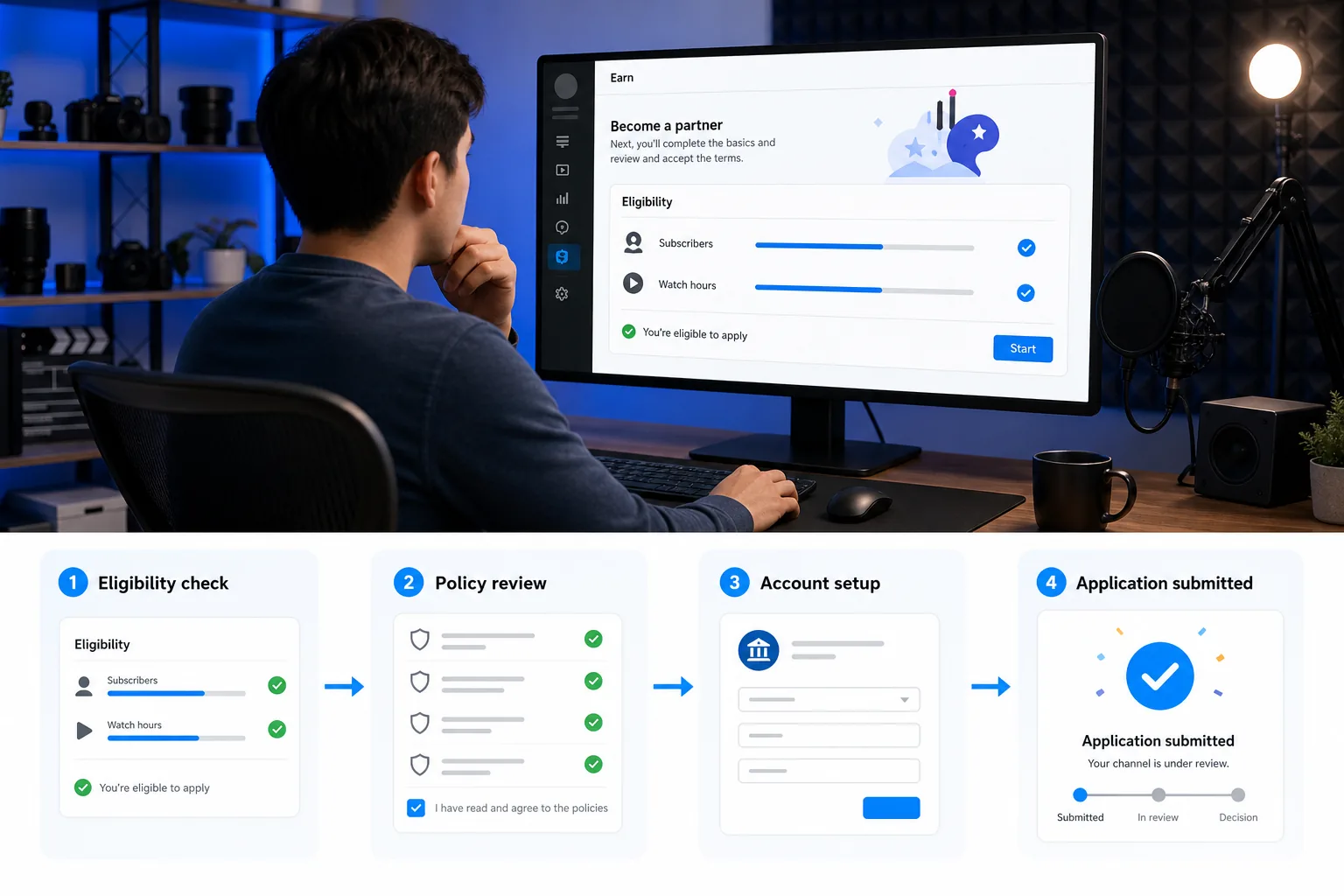
Before setting an income target, check the Earn area in YouTube Studio and confirm which YPP tier applies to your channel and region. Eligibility can change, and different features can have separate requirements.
For expanded access in eligible regions, the lower entry point generally requires 500 subscribers, three public uploads within the past 90 days, and either 3,000 valid public watch hours in the past 12 months or 3 million valid public Shorts views in the past 90 days. This tier can open some fan-funding and Shopping features. It does not mean you qualify for a share of ad revenue.
For full ad revenue access, YouTube lists a threshold of 1,000 subscribers plus either the applicable valid public watch-hour threshold or 10 million valid public Shorts views in the past 90 days. Shorts Feed watch time doesn’t count toward the public watch-hour route. Views and hours must meet YouTube’s definitions, so use the figures in Studio rather than adding up numbers from other analytics tools.
Numbers alone don’t secure approval. Your channel also needs to follow YouTube’s monetization rules, Community Guidelines, copyright rules, and other terms. Review the linked policy page before you apply. The rules address original content, repetitive content, and reused material. A channel can face a problem even when it has permission to use a clip, if the channel doesn’t add meaningful original value.
Make a simple readiness sheet and update it once a month:
- Subscriber count and public uploads within the required period.
- Valid public watch hours and qualified Shorts views.
- Any active Community Guidelines strikes or copyright issues.
- Videos that rely on third-party clips, music, or repeated templates.
If you’re still building toward the thresholds, use the Earn area’s notification option when available. DiSousa’s guide to YouTube monetization steps can also help you distinguish early YPP access from full ad revenue. Treat each tier as a separate milestone, not a guaranteed income date.
Step 3: Build a channel strategy around one clear audience promise
A channel strategy starts with one clear promise: who you help, what you help them do, and what kind of videos they can expect. Keep it narrow enough that a new viewer understands the channel after watching one video. You can broaden it later, once the audience’s needs become clearer.
Write a one-sentence promise before you plan a content calendar. For example: “I show first-time home cooks how to make weeknight meals with basic tools.” That sentence sets a boundary. A video about a cooking skill fits. A video about an unrelated personal finance topic probably doesn’t, unless you can explain why it belongs to the same audience.
Next, group planned videos into a few repeatable themes. A gardening channel might have beginner techniques, seasonal tasks, and tool demonstrations. The themes help you plan related videos without turning every upload into a copy of the last one. YouTube advises creators to use audience data to spot which content groups get the most interaction, then decide where future effort makes sense.
Choose a format that fits your time and skills. Long videos can support detailed lessons or reviews. Shorts can test a single idea in a short format. Live streams can give viewers a chance to ask questions in real time. You don’t need to use every format at once. Start with a format you can make well, then add another when you have a clear reason.
Now map the audience’s path from problem to next step. A viewer might discover a beginner video, watch a follow-up tutorial, then join an email list for a printable checklist. If you plan to sell a course later, the channel should first show that viewers want help with a specific problem. Don’t build a course around a topic simply because it seems profitable.
DiSousa’s YouTube creator course planning guide can help you turn a channel goal into a learning plan. Use it alongside your own audience notes, not as a substitute for them.
Before you record, test the promise against three planned topics. If you can’t explain why each topic serves the same viewer, tighten the channel focus. A clear promise makes it easier to choose what to publish next.
Step 4: Produce original videos with a repeatable, rights-aware workflow
A repeatable production workflow helps you publish without making every video from scratch. It should leave room for your own point of view, because YouTube expects monetized content to offer original value. A template can help you organize work. It can’t replace the substance of the video.
Start each video with a short brief. Write the viewer’s question at the top, then note the answer the video will deliver. Add the key example or demonstration that makes the answer useful. If your video is about repairing a loose cabinet hinge, show the hinge and the steps. If it’s a commentary video, explain what you add beyond the source material.
Draft a script or outline before filming. A simple structure works well: introduce the problem, show the answer, then explain what to do next. Keep the opening focused on the viewer’s question. During editing, remove pauses that don’t help the explanation, but don’t cut so much that the process becomes hard to follow.
Keep a rights record for every outside asset. Note where music, photos, footage, graphics, and sound effects came from. Check that the license permits commercial use. YouTube says creators need the necessary commercial rights for visual and audio elements, including material covered by a Creative Commons or royalty-free license. “Free to download” doesn’t automatically mean “free to monetize.”
Be careful with clips from films, games, music, or other creators. Permission, copyright, and YouTube’s reused-content review are separate questions. A video may avoid a copyright claim and still fail a monetization review if it adds too little original commentary or value. When you use third-party material, make your own contribution clear through analysis, teaching, or meaningful editing.
Use a checklist before upload:
- Does the video answer the question in its title?
- Can a viewer tell what original work you added?
- Do you have commercial-use rights for each outside asset?
- Are paid relationships or affiliate links disclosed clearly where required?
Keep project files and license records together. If a rights question comes up later, you’ll know what you used and why you believed it was allowed.
The embedded video below is included as a viewing break within this production section.
When you finish an upload, save the brief and checklist. The next video can use the same workflow, but its main lesson should still bring viewers a distinct idea or result.
Step 5: Publish consistently and use analytics to improve the next video
Consistency means choosing a schedule you can keep, not posting as often as possible. Pick a pace that leaves time to make each video useful. If one strong upload every two weeks fits your life, that is a better plan than promising weekly videos and missing the deadline.
Before publishing, make sure the title and thumbnail match the video. A title should say what the viewer will get. A thumbnail should make the subject easy to recognize on a small screen. Don’t promise a result the video can’t deliver. Accurate packaging helps the right viewers decide whether to watch.
After publishing, give the video time to collect useful data. In YouTube Studio, compare performance across related groups of videos rather than treating one upload as the whole story. Review audience interaction and patterns across content groups. You can also check the individual videos that drive a group’s results.
Look at the signal that matches the video’s purpose. For a tutorial, check how long viewers stay and where they leave. For a video meant to reach new viewers, review whether people click after seeing the title and thumbnail. For an offer-related video, track the next action, such as visits to a course page or sign-ups for an email list.
Don’t read one metric in isolation. A lower click-through rate may mean the thumbnail needs work, but it may also reflect who saw the video. A short average view duration may point to a weak opening, or to a video that answers a simple question quickly. Compare similar formats and topics before changing your whole plan.
Use a short review after each upload:
- Write down the main goal of the video.
- Check the audience response that best matches that goal.
- Note one part to keep and one part to change.
- Apply that change to the next related video.
For example, if viewers leave before a tutorial reaches its first demonstration, move the demonstration earlier next time. If viewers watch through but don’t click the linked resource, make the next step clearer in the video itself. Change one thing at a time so you can see what helped.
Focus on viewers’ interests and satisfaction rather than searching for secret title tricks. A steady review habit gives you better questions to test. It also keeps you from copying a trend that doesn’t fit your audience.
Step 6: Apply for monetization when eligible and review every setup step
When Studio shows that your channel is eligible, apply through the Earn area and complete each signup task. YouTube’s current full YPP route includes qualifying-view requirements, including 1,000 subscribers with 10 million qualified Shorts views in the past 90 days. You still need to meet the channel and policy requirements.
Before applying, review the channel as a whole. Check the recent uploads and the videos that make up most of your watch time. Look for repeated formats with little variation, reused clips, unclear rights, or content that may not meet advertiser-friendly rules. Reviewers can assess more than the one video you think best represents your channel.
Then follow the steps shown in Studio. Accept the relevant YPP terms, link an active payment account, and submit the application for review. Check the Earn area for status updates. YouTube says review decisions typically take about a month, though delays can happen. Don’t plan your household budget around a specific approval date.
If YouTube rejects an application, read the reason and address the issue across the channel before reapplying. A reapplication works best when you’ve fixed the issue across the channel, not only edited one upload.
After acceptance, review the monetization modules and enable only the features that suit your channel. Ads, Shorts Feed ads, memberships, and fan-funding features may have separate terms. Confirm that your payment account is active. YouTube may pause monetization if an approved payment account isn’t linked.
Keep an eye on policy notices after approval, too. YouTube can review channels over time, and an inactive channel may lose monetization if it has no uploads or Posts activity for six months or more. The goal is not to post constantly. It’s to keep the channel active while maintaining the standards that earned approval.
One date needs attention: YouTube says updated YPP terms are due to take effect on February 1, 2027, with creators asked to review and accept them in Studio by January 31, 2027. Check your own Studio notices as the date approaches, since the platform’s current instructions are the source to follow.
Step 7: Develop additional revenue paths and review the results responsibly
Ads are one possible income source, not a full business plan. Depending on your audience and eligibility, YouTube income may include advertising, paid-subscription revenue, memberships, shopping features, or fan-funding features such as Super Chat. Sponsorships can also fit when a brand and its offer make sense for the people who watch you.
Outside the Partner Program, creators may earn through affiliate links, digital products, services, licensing, or a paid learning offer. Each path asks for a different kind of work. Affiliate marketing means you may earn a commission when someone buys through your tracked link. A digital product needs a clear use for the buyer. A sponsorship needs a transparent agreement about what you’ll make and what the sponsor expects.
An online course can work when viewers keep asking for help with a skill or process that can be taught in steps. Start by checking for that demand. Read comments and questions, then note the problem people repeat. Draft a short course outline around that one problem before you record lessons. Each lesson should help learners complete a task, not just repeat information they can find in a public video.
Next, choose where and how to sell the course. You’ll need a way to host lessons, take payment, and deliver access. Decide whether learners need only recorded lessons or also need worksheets, feedback, or live support. Keep the first version narrow. You can add lessons after you see where learners get stuck.
Set a price based on the offer’s scope and the support included. Don’t base it on hoped-for income or what a bigger creator charges. Write down the costs you’ll face, such as hosting, payment fees, editing, or customer support. Then test the sales page with the same audience the videos serve. A clear promise and honest description reduce confusion after purchase.
Promote the course through videos that answer related questions. Use the end screen or description to point viewers toward a relevant lesson or offer. A community post can ask what learners still need help with. An email list gives you a way to share new lessons with people who asked to hear from you. Avoid turning every upload into a sales pitch. The free video should still solve a useful part of the problem.
Track each income route separately. Record views, clicks, sign-ups, sales, refunds, and the time spent producing each offer. Don’t claim a channel earned a certain amount unless you have records to support it. Income varies, and a course or a channel can take time to find its audience.
DiSousa focuses on marketing education and the systems that connect content with paying clients. If you want to build a business around your channel, use the same careful approach: check viewer demand, make a useful offer, and review the results before expanding it.
Frequently Asked Questions
Can I monetize YouTube without taking a course?
Yes, you can learn the basics without paying for a course. A course may help when you need a planned set of lessons or feedback on a specific skill. Before paying, make sure its lessons match a real gap in your channel work.
How many subscribers do I need to monetize on YouTube?
A Shorts-based route to full ad revenue access generally requires 1,000 subscribers plus 10 million qualified Shorts views in the past 90 days. Some eligible creators may access certain features at a lower tier. Check the Earn area in Studio for the requirements that apply to your channel.
How long does YouTube monetization approval take?
YouTube says a YPP review typically takes about a month after you complete the signup steps. Delays can happen, so don’t treat that estimate as a deadline. Check your application status in the Earn area of Studio. Before applying, review the channel’s content and policy status to avoid preventable issues.
Can Shorts help me qualify for monetization?
Yes, qualified Shorts views can count toward the Shorts-based YPP eligibility route. Full ad revenue access requires 10 million qualified Shorts views within the past 90 days, alongside 1,000 subscribers. Shorts Feed watch hours don’t count toward the separate long-form route. Confirm your current progress in Studio.
Can I sell my own course through YouTube?
Yes, you can use videos to introduce a topic and direct interested viewers to a course you sell elsewhere. Make sure the offer teaches a clear skill or process that viewers want help with. Your course needs a way to host lessons and deliver access. Be clear about the contents, price, and support before someone buys.
Conclusion
Choose training that solves your next channel problem, then apply the lesson to a video you can publish and review. Check YPP rules in Studio before building your plan around platform income. Your next step is simple: write your audience promise and the topic of your next useful video. YouTube income isn’t guaranteed; results depend on your content, audience, eligibility, and offers.
