
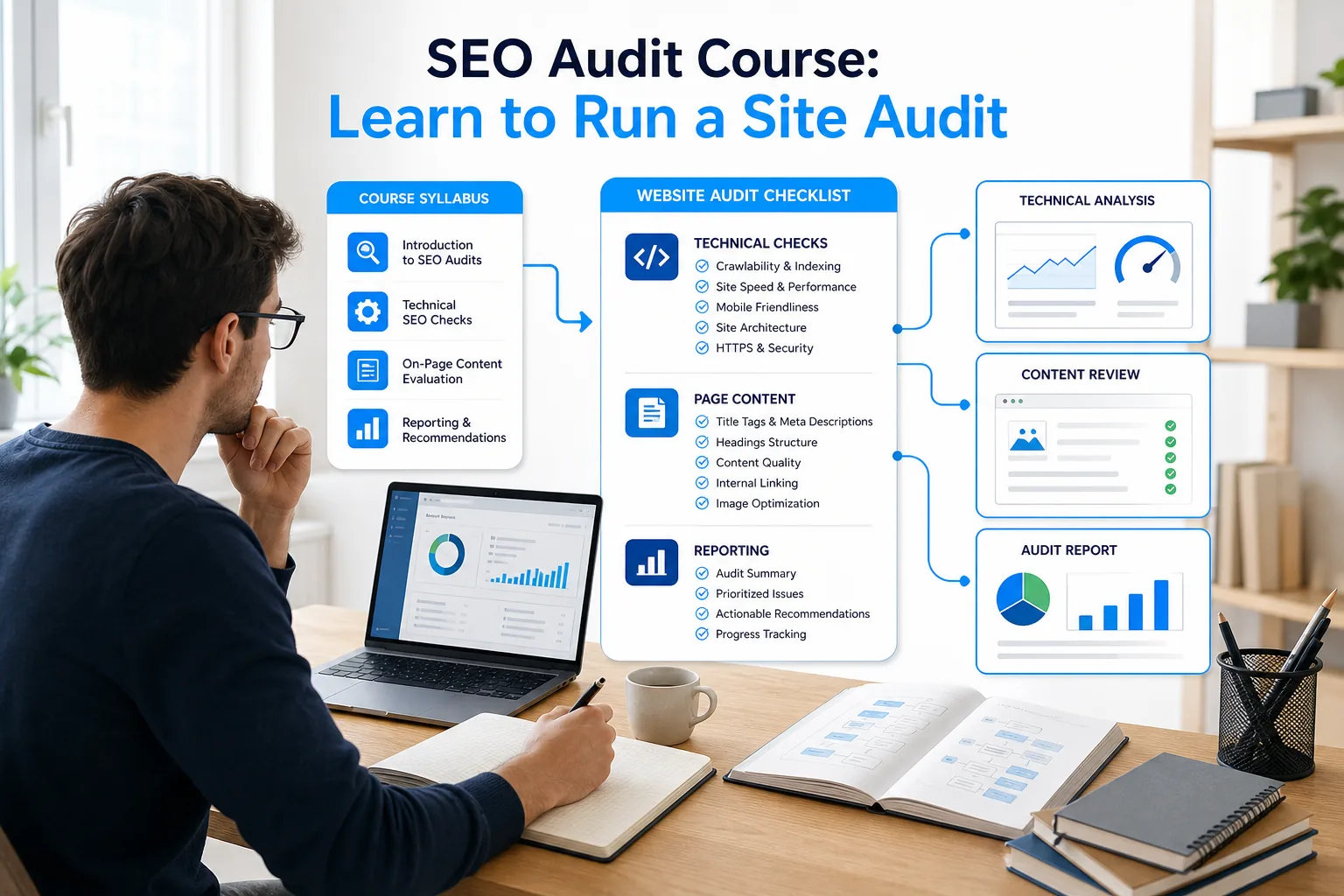
A course can show you what to check, but the skill comes when you can explain what a finding means and what to do next. An SEO audit course should give you a method you can test on a site, then refine through practice.
I’m Antonio De Sousa, an online and digital marketer. DiSousa compares marketing education and shares guidance for building useful skills. Use the steps below to judge a course, run your own audit, and make work you can show.
- A course is useful when it teaches a repeatable audit process, not only a list of possible issues.
- Start with a clear site goal and a saved baseline before you crawl pages.
- Check technical access first, then review page content and authority signals.
- Prioritize findings by business effect, effort, and risk before writing recommendations.
Step 1: Define What You Need an SEO Audit Course to Teach
Write down the audit work you want to do before you compare courses. A useful course should connect each lesson to a check you can perform and a decision you can explain.
An SEO audit is a structured review of a website’s ability to be crawled, understood, and found in search. It looks for barriers and opportunities across technical setup, page content, internal links, and external links. The purpose isn’t to collect warnings. It’s to decide which changes are worth making.
Start by naming your goal. You may want to check your own affiliate site, prepare for freelance client work, or support an in-house marketing team. Each goal changes the depth you need. A site owner may need to spot broken pages and improve key content. A consultant also needs to explain scope, evidence, priority, and next steps to someone else.
Make a skills checklist for the outcome you want. A course should teach you to:
- Check whether important URLs can be crawled and indexed.
- Review page titles, descriptions, headings, and content quality.
- Find broken links, duplicate pages, and weak internal paths.
- Read search performance data without treating every dip as a site fault.
- Turn findings into tasks that a writer, developer, or site owner can act on.
One course offers a comprehensive 50-point SEO audit checklist, is designed for beginner-to-advanced learners, and includes a Certificate of Completion and Instructor Q&A support. Those details give you a starting point for judging fit, but your own goal should decide whether the course is enough.
Look for the gap between knowing a term and doing the work. A lesson that defines indexing is a start. You also need to know how to inspect a URL, find the related evidence, and explain what should happen next. If you want a more technical focus, DiSousa’s technical SEO course comparison can help you explore training that covers topics such as crawlability, speed, and JavaScript.
Write one sentence that describes your target skill. For example: “I can review a small business site, show the evidence behind the main issues, and give the owner a clear order for fixing them.” If a course can’t help you move toward that sentence, it may not be the right one for now.
Step 2: Check the Course Syllabus, Support, and Practice Work
Read the syllabus as a work plan. It should show how lessons move from concepts to an audit you can complete and explain.
Look for coverage across the main audit areas. Technical lessons should address crawling, indexing, URLs, redirects, site speed, and mobile use. On-page lessons should cover page intent, titles, descriptions, headings, content quality, and internal links. Off-page work should explain how to assess backlinks without treating every link as useful or harmful by default.
Next, look for practice. A course may have videos, readings, quizzes, or assignments. The format matters less than whether you must apply a lesson to a real or sample site. You should leave with work products such as a crawl review, an issue log, or a short report, not only a completed video playlist.
Check how the course handles questions and feedback. Instructor Q&A can help when a lesson leaves you unsure how to read a finding. Peer review may help you notice gaps in your reasoning, though you should still check factual claims against reliable documentation. Ask whether assignments are graded, whether you can use your own site, and whether the course expects you to bring tools of your own.
For example, a checklist-led course can give you an orderly set of checks to work through. You’ll still need a site and a way to inspect it. A checklist is a map, not the audit itself. The distinction matters when comparing a checklist with training that includes applied project work.
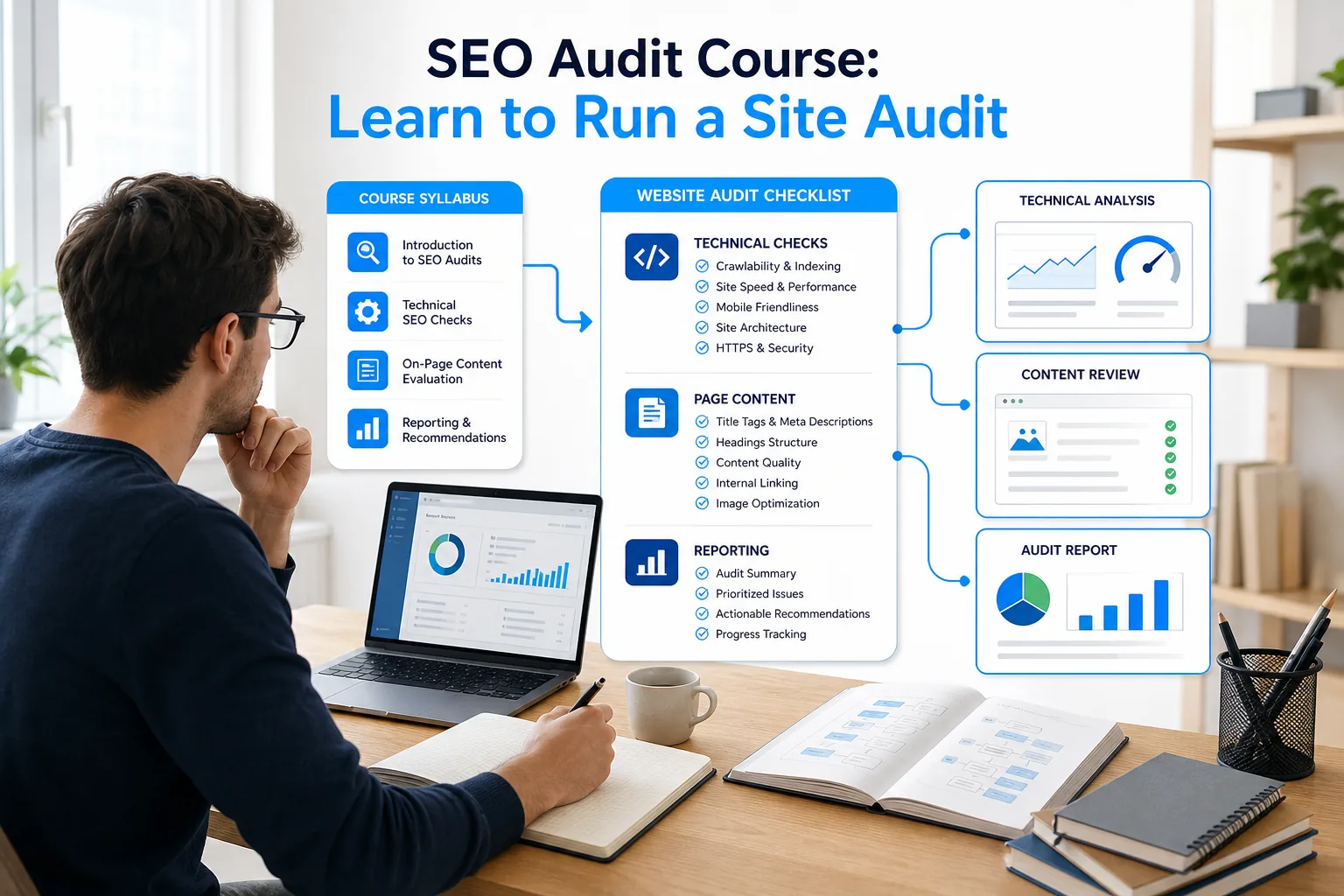
A project-based course can help you practice the handoff as well as the checks. Look for assignments that connect analysis with communication, and compare that work with the tasks in any course you’re considering.
Use a simple syllabus scorecard. Mark each topic as “explained,” “practiced,” or “reviewed with feedback.” Then note the proof you’ll have at the end. An explained concept is knowledge. A practiced check is a skill. Feedback can reveal where your method needs work.
Be careful with certificates. A certificate can show that you completed a program, but it doesn’t prove you can find a meaningful issue or recommend a safe fix. A clear audit sample demonstrates your ability to find meaningful issues and recommend safe fixes; a credential alone does not. DiSousa’s SEO certification course comparison offers a separate way to assess credentials alongside the work they ask you to complete.
Milestone: Before you enroll, you should know what the course covers, what work you’ll complete, and what support is available when you get stuck.
Step 3: Set Up a Practice Site and Record a Baseline
Choose a site you’re allowed to inspect, then save its current state before making changes. That baseline lets you compare later results with what you saw at the start.
Your own site is a good place to practice because you can check pages and make changes with permission. If you don’t have one, build a small practice site or ask a site owner for written approval. Don’t crawl a client or another business’s website without permission. Keep the first project small enough to review by hand.
Set the audit scope before opening a tool. Write down the site’s goal, the pages that support that goal, and the questions the audit should answer. For a small online shop, you might focus on category pages and key products. For a local service business, include the main service page and location pages. A defined scope helps you avoid spending hours on low-value pages.
Save a baseline from Google Search Console if you have access. Record the date range and note clicks, impressions, average position, and any indexing concerns relevant to your scope. These measures describe search performance; they don’t prove why a change happened. Add a few screenshots or exports so you can find the same view later.
Also save a page inventory. A spreadsheet can include URL, page type, intended topic, index status, current title, and a short note. Keep the columns useful. You don’t need a complex dashboard to start. A clean sheet is easier to update and makes it less likely that findings disappear in a pile of exports.
For a basic audit, Google Search Console gives you first-party search and indexing information. A crawler such as Screaming Frog can help you review page-level patterns across a site. Paid SEO platforms can add backlink or competitor data, but don’t buy access before you know what question you need the tool to answer. The tool list in DiSousa’s beginner SEO tools overview can help you compare common starting points.
Choose one crawl method and keep its settings consistent. Record the date, the pages included, and any limits you set. If you change the scope midway, mark that in your notes. Otherwise, a later comparison may look like a site change when you only changed the way you collected data.
Before you run a crawl, check that you have permission and that your settings won’t overload a site. For a practice site, start at a modest scope. If you see an issue that needs a developer, write down the evidence rather than changing code you don’t understand.
Milestone: You should now have a defined audit scope, a saved performance baseline, and a page list you can use to track findings.
Step 4: Run the Audit in a Consistent Order
Audit in a set order so that early checks don’t depend on later assumptions. Begin with access and indexing, then move to page quality and authority.
Start with crawlability and indexing
First, check whether the pages in scope can be reached and indexed. Review the site’s robots.txt rules and sitemap as part of that check. Look for blocked pages that should be available. In Search Console, compare the pages you expect Google to index with the reported indexing state.
Review status codes next. A 404 page is missing; a redirect sends visitors and crawlers to another URL. Confirm that redirects lead to the right destination. If several versions of a page exist, check whether the preferred version is clear and consistent.
Then inspect site structure. Can a visitor reach important pages through useful navigation or internal links? Are key pages buried several clicks deep? Look for orphan pages, which are pages with few or no internal links pointing to them. A crawler can flag patterns, but you need to decide whether those pages matter to the site’s goals.
Review page content and on-page signals
Once you know important pages can be found, judge whether each page serves a clear purpose. Compare the page title, main heading, and content with the search need the page targets. Check for duplicate titles or descriptions. Look for thin pages that provide little help, rather than treating a short word count alone as proof of poor quality.
Check internal links in context. A link should help readers reach a related page or take a sensible next step. If a page is important but hard to find, record where a link could fit. Also check for broken links. A broken link can interrupt a reader’s path and may point to a page that needs repair or removal.
Check performance and off-page signals
Review mobile use and page speed after the basic access checks. If a page loads slowly, note the affected URL and gather enough detail for the person who will fix it. Don’t write “speed is bad” as a recommendation. State what you observed and what should be checked next.
Backlink review comes after you understand the pages and topics that matter. Look for patterns in the links pointing to the site, then review unusual examples before making a recommendation. A high count doesn’t automatically mean a strong profile. Avoid advising someone to remove or disavow links based only on a tool label.
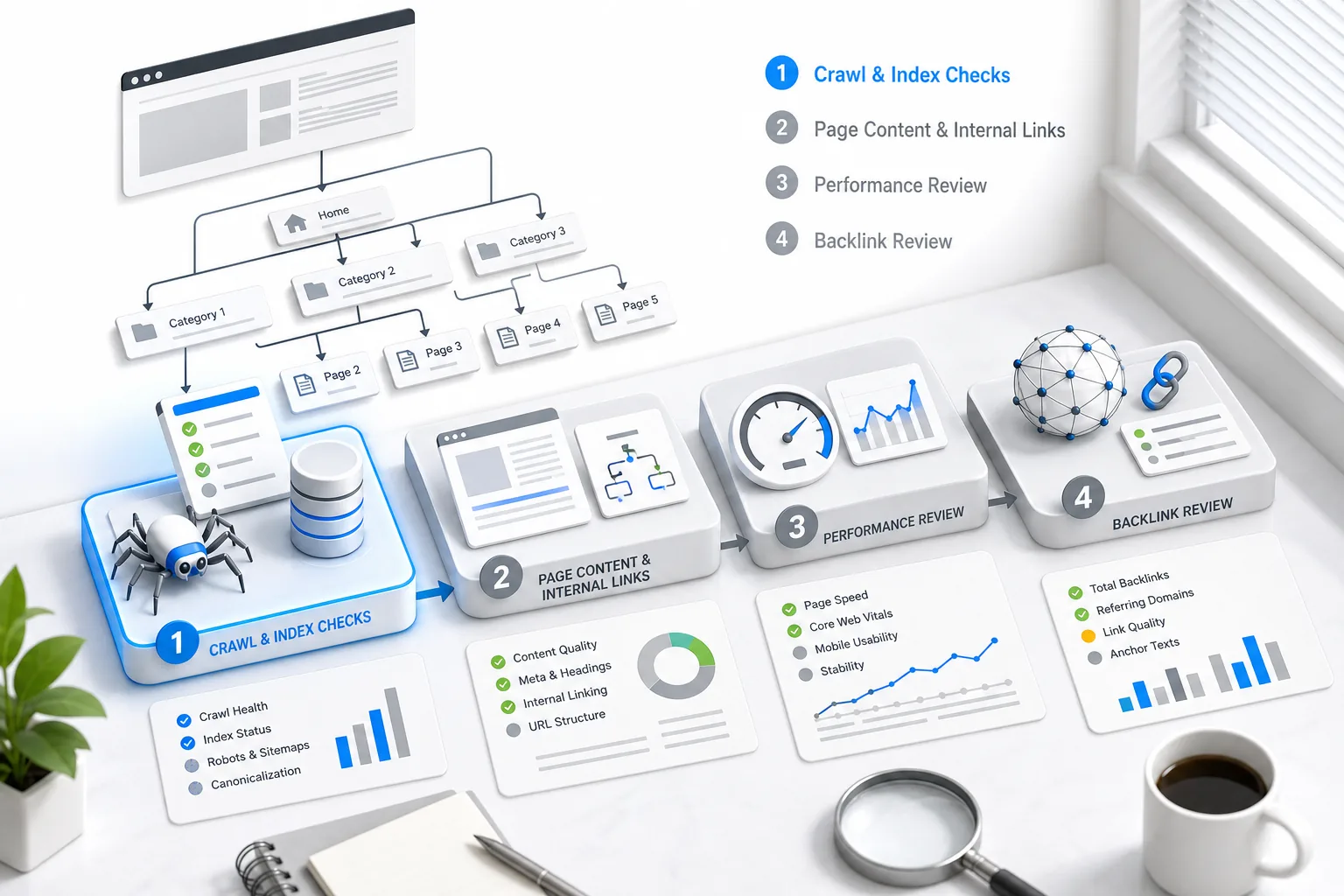
Use free tools first where they answer the question. Search Console helps you see search and indexing data for a site you control. A crawler helps you examine many URLs in one pass. Paid tools such as Ahrefs or Semrush may help with backlink and competitive research when those tasks are part of your scope. Don’t treat a platform’s score as the finding; verify the issue on the page or in the source data.
AI tools can help sort notes or draft a first version of an issue summary, but they can also state a guess as fact. Don’t give an AI system private client data unless you have permission and understand the tool’s data terms. Keep a human in charge of verification. Ask it to organize evidence you provide, not to invent evidence or make site changes.
For local sites, add checks for location pages, business details, and the way service areas are described. Make sure location pages have a useful reason to exist beyond swapping one city name for another. Check that the site makes the business’s service area clear. If a business relies on a local profile or directory data, verify those details directly with the owner.
Milestone: Your notes should separate verified findings from questions that need more evidence. You’ll be ready to prioritize only after that distinction is clear.
Step 5: Prioritize Findings and Write Clear Recommendations
Rank each finding by likely impact, effort, and risk. Then write a recommendation that names the evidence, the action, and the person or role best suited to do the work.
Begin by removing duplicates. A crawl may show the same problem on many pages. Group those URLs under one pattern, then note how many pages are affected within your audit scope. That turns a long report into a smaller set of decisions. Don’t assume that a repeated warning is high priority just because it appears often.
For each issue, ask three questions:
- Could this block an important page from being found or understood?
- How much work might the fix take, and who needs to do it?
- Could the change break something else or create a new problem?
Add business value to those questions. A problem on a page that brings leads or sales deserves a different review from the same issue on a page that no one visits. A single broken internal link on a key service page may matter more than many low-impact issues on older pages.
Use a short issue record. Include the affected URL or page group, evidence, user or business effect, suggested action, owner, and a way to verify the fix. If you can’t explain the evidence in plain words, don’t present the claim as confirmed. Mark it as a question to investigate.
Here’s a useful format: “The main service page returns a 404 response when linked from the navigation. Restore the intended page or update the navigation link. The site owner should test the menu after the change and confirm the page loads.” The note tells the reader what happened and how to check the result. It doesn’t promise a ranking increase you can’t prove.
Write recommendations for the person who will act on them. A developer needs the URL, observed behavior, expected behavior, and acceptance check. A writer needs the page goal and the specific content gap. A business owner needs a short reason to approve the work. One report can serve all three if each action has a clear owner.
The audit course is only part of this skill. Use the checklist to find candidate issues, then apply judgment before assigning priority. In a client meeting, lead with the few changes that matter most. Keep lower-priority notes in an appendix or a later work list, so the important items don’t get lost.
Make a short report rather than sending raw exports. Start with the audit scope, then show the highest-priority findings. Put supporting detail after the summary. A useful report lets someone who didn’t run the crawl understand what you found and what should happen next.
There’s a short video below to help you think through the audit process. Use it as a companion to your own notes, not as a substitute for checking the site’s evidence.
The video is a visual aid for reviewing an audit workflow. As you watch, pause at each check and record what evidence you would need before making a recommendation.
Milestone: Your report should help a site owner decide what to fix first, who should own it, and how to confirm the work is done.
Step 6: Practice, Review Your Work, and Build a Credible Portfolio
Repeat the audit process on more than one site, then save a sample that shows your reasoning. A portfolio should show how you move from evidence to action, not only that you know SEO terms.
Start with a site you control. Finish the audit before making changes. Save the scope, evidence, and recommendation list. Then choose one small change you can safely make. Record what changed and check the result after it has had time to be reflected in the site and its search data.
Be careful when you describe results. Search rankings can shift for many reasons, and a short period of data may not show the effect of one edit. Report what you can verify. For example, say that you corrected a broken link and confirmed the destination loads. Don’t say the fix raised traffic unless you have evidence that supports that claim.
Ask someone else to review your report. They should be able to answer these questions without asking you to translate the jargon:
- What page or group of pages has a problem?
- What did you observe that supports the finding?
- What action do you recommend, and who should take it?
- How will the site owner know the task is complete?
For each sample, remove private details and get permission before sharing screenshots or client information. A portfolio can show the problem pattern without exposing a business’s analytics or internal setup. You can also create a sample audit for a practice site and label it clearly as a learning project.
Build your work sample around one clear story. Explain the audit scope, show a small number of verified findings, and include the reasoning behind the order you chose. Add a sample issue log or a short report page. A reviewer should be able to see the quality of your thinking without reading every crawl row.
If you plan to offer audits as freelance work, define the service narrowly at first. You might offer a fixed-scope review of a small site, then state what the client receives and what falls outside the work. Don’t promise rankings or revenue. Those results depend on factors beyond one audit and one person’s control.
With more work, you can build toward a broader SEO role. Auditing connects technical checks with content decisions and client communication. A course certificate may support your profile, but your sample report gives a future client or employer something they can assess directly.
DiSousa is a place to compare marketing courses and build your learning plan. As you work through an audit, keep notes on which skills still feel uncertain. Use those gaps to choose your next lesson instead of collecting certificates without a clear task in mind.
Milestone: You should have one shareable audit sample, a clear note on what you verified, and a list of skills to practice next.
Frequently Asked Questions
What does an SEO audit course teach?
An SEO audit course teaches you how to inspect a website for issues that can affect search visibility. Strong training connects technical checks with page content and reporting. Look for assignments that make you review a site, support findings with evidence, and write recommendations. A certificate can show completion, but it can’t replace a sample of your audit work.
Can I learn SEO auditing for free?
Yes, you can learn many audit basics with free lessons and free site data tools. You’ll still need a site you can inspect and a way to practice each check. Paid training may add a set course path or support, so compare the work it asks you to complete with what you can learn on your own.
What tools do I need to run an SEO audit?
You can begin with Google Search Console for search and indexing data, plus a crawler for reviewing site URLs. Add other tools only when they answer a specific question, such as backlink research. The right setup depends on the site and audit scope. A tool’s warning or score is a lead to verify, not a final recommendation.
How do I make an SEO audit report?
Start with the audit scope, then list the most important verified findings. For each one, include the affected page, evidence, likely effect, recommended action, owner, and a check for confirming the fix. Group repeated issues instead of pasting every tool alert into the report. Keep raw exports as supporting material rather than the main deliverable.
Does an SEO certificate qualify me to work as an SEO auditor?
A certificate can show that you completed a course, but it doesn’t prove that you can audit a site well. Build a sample report that shows your evidence and reasoning. Be clear about what you can handle and when a specialist should review technical work. That honest scope helps clients judge your skills more fairly.
Conclusion
Choose training that makes you practice the full path from site check to clear recommendation. Then run a small audit on a site you’re allowed to inspect and save the work as a portfolio sample. If you’re choosing your next lesson, start with the one skill your sample report shows you still need to improve.
Income disclaimer: Learning SEO or offering audit services does not guarantee income. Results depend on your skills, clients, effort, and other factors.
