
If you’re figuring out how to learn Google Ads, start with the basics before spending money: learn how search ads work, then build one small campaign you can measure. The platform can automate many choices, but you still need to know what you want it to do. I’m Antonio De Sousa, and DiSousa shares learning paths for people building online businesses and marketing skills.
We analyzed 42 comments and questions from Reddit, Quora and YouTube about learning Google Ads and found that 24% mentioned up-to-date course content.
- A focused campaign for reaching people actively searching is a clear starting point for learning how keywords, ads, and landing pages work together.
- Use exact or phrase match at first, then review search terms and add negative keywords to block poor-fit traffic.
- Set up conversion tracking before you ask a campaign to optimize for leads or sales.
- Keep the first test small enough that you can inspect its settings and results yourself.
Step 1: Learn How Google Ads Auctions, Ad Rank, and Quality Work
Start by understanding the auction. Google Ads does not give every search result to the advertiser with the highest bid. It uses Ad Rank to decide whether an ad can show and where it may appear. Your bid matters, but so do ad quality, the searcher’s context, and the expected effect of ad assets.
Think of each search as a fresh match. A person searches for a service in a certain place and on a certain device. Google assesses eligible ads for that moment. A large bid can’t fix an ad that doesn’t fit the query or a landing page that sends the visitor somewhere unrelated.
Quality Score is a diagnostic measure for keywords. It can help you spot a mismatch between the search, your ad, and the page people reach. Don’t treat it as a score to chase on its own. Instead, ask whether the ad answers the search and whether the page makes the next step clear.
For example, say you sell a bookkeeping course and bid on a search about bookkeeping lessons for freelancers. An ad that names the course and speaks to freelancers fits that intent better than a broad ad about online business. The landing page should continue that same idea, rather than drop visitors on a general home page.
Google’s free Skillshop learning hub is a sensible place to begin. Its introductory learning materials can help you learn core terms before you enter campaign settings. The available learning path is commonly estimated at about three to four hours, but your own pace may differ.
As you study, keep a short glossary. Define a campaign as the level where you set broad goals and settings. An ad group holds a closely related set of keywords and ads. A conversion is the action you want a visitor to complete, such as a purchase or a lead form submission.
Set your own pace instead of trying to finish everything in one sitting. Learn a concept, write down what it means in your own words, then find where it appears in the account.
The video can support your first pass through campaign setup. Treat any tutorial as a visual aid, not a replacement for checking the live settings in your own account. Google changes its interface, and the labels may not match an older recording.
Milestone: You should be able to explain why bid size alone doesn’t decide ad placement, and name the search, ad, and page match you want to create.
Step 2: Research Keywords, Match Types, and the Audiences You Want to Reach
Choose keywords by the job a searcher wants done. Start with phrases that describe your product or service in plain terms. Then sort them by intent. Someone searching for a course may be researching options, while a person searching for a specific service in a nearby area may be ready to contact a provider.
Open Keyword Planner in your Google Ads account to review ideas and search forecasts. Use those suggestions as prompts, not as a ready-made campaign. Check each phrase against your offer and the page you plan to send people to. If the phrase would bring a visitor who cannot become a customer, leave it out.
Match types control how closely a search needs to relate to a keyword before your ad may show. Exact match gives tighter control around the keyword’s meaning. Phrase match allows related searches that include the phrase’s intent. Broad match can reach a wider range, which may be hard to judge before you have conversion data.
For a first campaign, use exact or phrase match for your main terms. Group keywords by one shared theme. A freelancer tax course and a small-business accounting service should not sit in one ad group just because both involve money. Their visitors need different ads and pages.
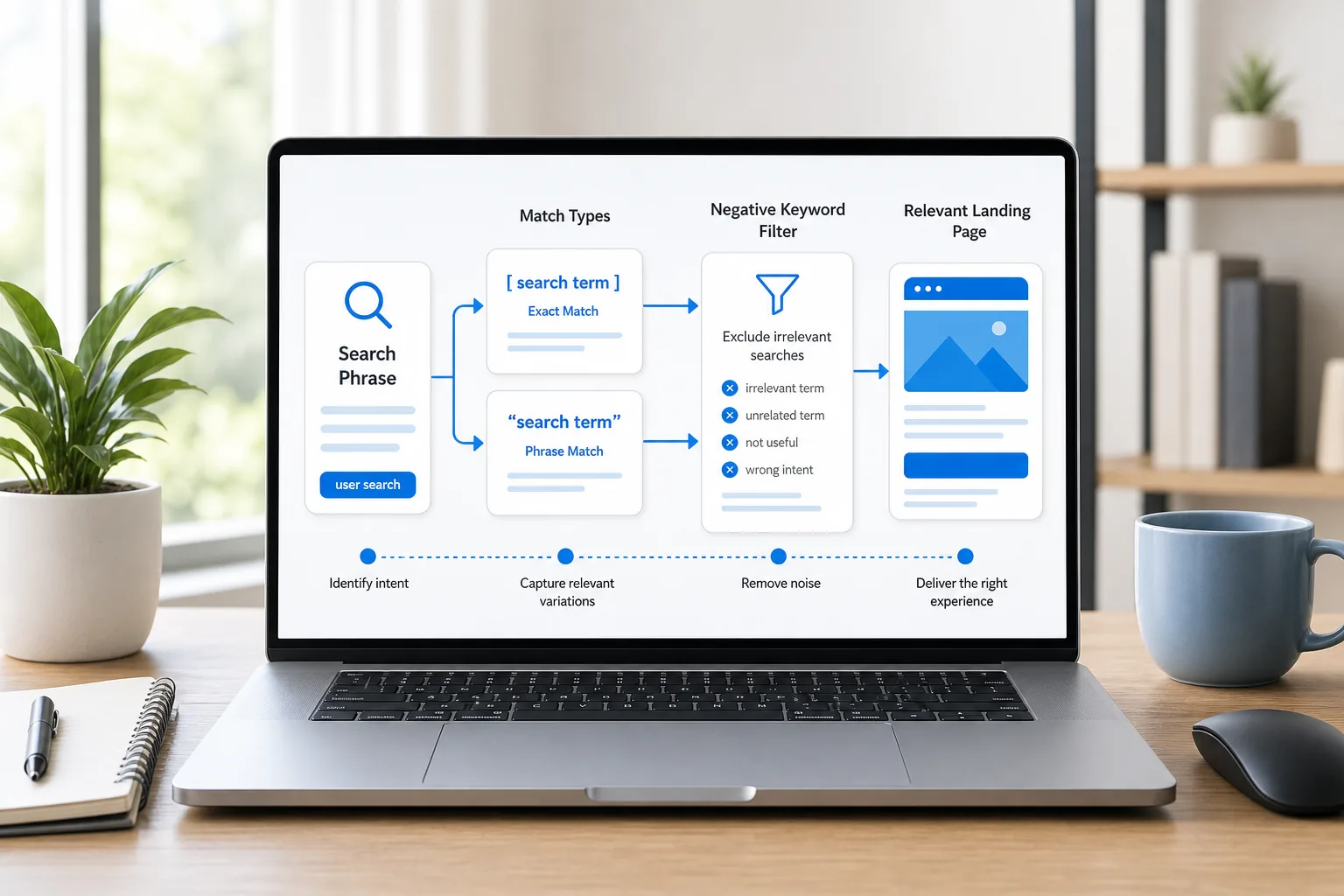
Negative keywords block searches that don’t fit your offer. If you teach paid advertising, searches that clearly ask for a free template may not fit a paid course. Add negatives based on actual search terms and your business rules, not on guesses alone. A term that looks irrelevant in isolation may still reflect a useful customer need.
Once ads begin showing, review the search terms report. Look for phrases that triggered your ad but don’t match the offer. Add a negative keyword when the mismatch is clear. Keep a note of the change and its reason, so another person can understand why you blocked that traffic.
Keyword targeting is only one part of who sees an ad. Set the location to the places you can serve. Check the location option that determines whether people must be in your selected area, rather than merely showing interest in it. Match language settings to the language used in your ads and on your landing page.
Device and demographic settings can help you understand who responds, but avoid narrowing too soon without evidence. Audience segments can include people who are actively researching a category or people who have interacted with your site before. Treat these signals as ways to observe or refine reach, not as proof that every person in a segment is ready to buy.
Keep the first keyword list short enough to review. A tight list makes it easier to see which intent, message, and page belong together. Later, you can expand when the search terms report shows a clear new theme worth testing.
If you want a guided learning path alongside hands-on practice, DiSousa Marketing Education is one option to consider. DiSousa also has a comparison of Google Ads courses for learners deciding how much structure they need before managing a campaign.
Milestone: You should have a small keyword list grouped by intent, a first set of negative keywords to watch for, and location settings that fit your service area.
Step 3: Create Your Account and Set Up a Focused First Campaign
Create or sign in to a Google Ads account, then build a campaign focused on search queries around one business goal. A campaign objective can change which setup prompts appear. The key choice is still the outcome you can measure, such as a completed purchase or a submitted lead form.
Before you build, write a one-sentence campaign brief: who you want to reach, what you’re offering, where you can serve them, and what action counts as a result. This simple note helps you avoid settings that sound useful but don’t match the work your business can handle.
A campaign focused on search queries can help you learn how a query, keyword, ad, and landing page connect. Other campaign types have different uses. Product-focused ads may suit stores with a product feed. Video ads can appear on video platforms. Image-based ads use visual placements. A campaign that combines placements across Google’s ad inventory can make it harder for a new advertiser to isolate what is driving a result.
Keep the first campaign focused on one offer and one audience need. If you serve several cities, you can make a separate campaign later if the message or service differs. At the start, too many campaigns split a small budget and make it harder to see what caused a change.
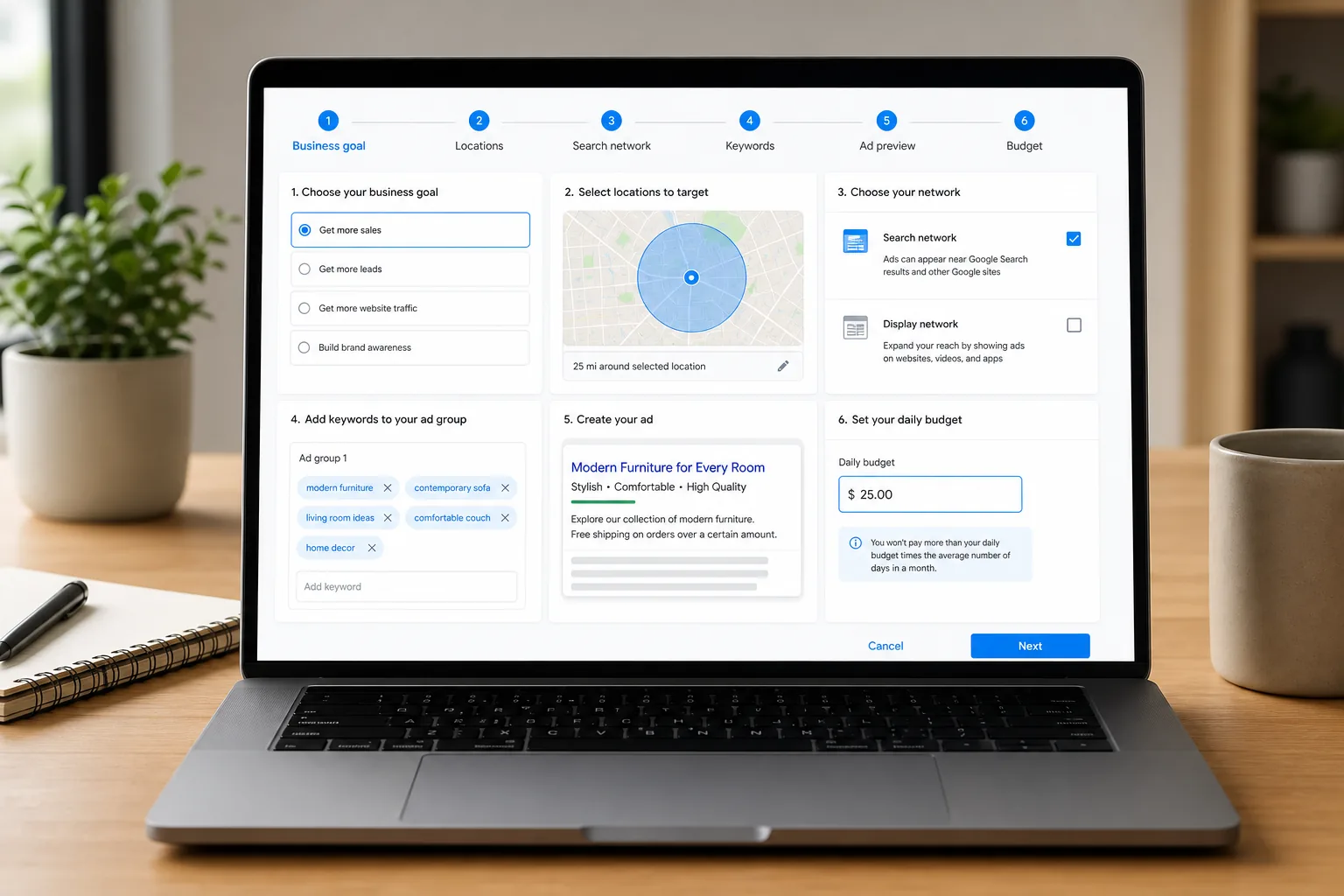
Give the campaign a name you’ll recognize later. A useful naming pattern can include the channel, offer, and service area. Keep the name plain. It’s for your own account organization, not an ad message.
Review network settings before publishing. For a first campaign focused on search queries, check whether visual-ad placements are included. Text-based and visual placements behave differently, so mixing them at the start can muddy your read on performance.
Set the campaign’s location with care. A local provider serving one town should not pay for clicks from places it cannot serve. Check the location option for people physically present in the target area if that matches your business. If you sell online across a wider region, use the locations that match your actual delivery or service rules.
Choose a daily budget you can afford to test without relying on a quick return. A daily budget is a planning control, not a promise of equal spend each day. Check the amount and the account billing setup before the campaign goes live. You should know what the test can cost if it brings clicks without a sale.
Keep settings notes. Record the campaign goal, locations, networks, keywords, budget, and date you launched. If you make a change later, add the date and reason. That record helps you separate the effect of a setting change from normal day-to-day variation.
DiSousa’s Google Ads certification guide can help you plan a separate study track. Certification can check what you know, but it does not replace setting up a campaign and reviewing what happens after launch.
Milestone: You should have one campaign focused on search queries with a clear goal, a defined service area, a checked network setup, and a budget you can afford to test.
Step 4: Write Relevant Ads and Build a Landing Page That Delivers
Write an ad that answers the search and makes a clear next step. A strong message starts with the visitor’s need, names the offer, then explains what action to take. Keep the promise in the ad aligned with what the landing page can deliver.
For each ad group, make sure the keyword theme is narrow enough to support one useful message. If the group is about beginner Google Ads training, an ad about advanced agency management may attract the wrong click. A clear match can help the visitor decide whether your offer fits before they click.
Prepare more than one headline angle. One can name the offer. Another can focus on who it helps. A third can make the next action clear. Keep each headline distinct so you can learn which message resonates, rather than repeating the same claim in different words.
Descriptions should add useful detail. Explain what the visitor will find on the page, what they need to do next, or what makes the offer relevant to their search. Don’t promise a result you cannot support. A course can teach a skill, for example, but that alone does not guarantee an income or a specific campaign outcome.
Ad assets give an ad more useful details or additional links. Review the asset types available in your account, then choose ones that fit the business. Sitelinks can point to useful pages. Callouts can state short facts about an offer. Structured snippets can show categories or service types where appropriate. Avoid adding an asset just to fill space.
Now check the landing page. It should make the offer visible without forcing people to hunt for it. The headline should reflect the ad’s promise. The page should explain the next step, whether that means buying, booking, or sending a form.
Use a single main call to action. If the ad asks someone to request a consultation, don’t land them on a page dominated by an unrelated newsletter prompt. Keep the form short enough to complete, and make sure the confirmation message appears after submission.
Check the page on a phone as well as a desktop. Make sure text is easy to read and the main action works. A slow or broken page can waste a click even when the ad itself is relevant. Check every link or form you expect a visitor to use.
Test one meaningful change at a time. You might compare a headline focused on the offer with one focused on the user’s problem. Or test a shorter landing page headline against a more specific version. If you change several pieces together, you won’t know which change affected the result.
Read the ad and page together out loud. If they sound like separate offers, revise the wording before launch. The click is only the start of the visitor’s path.
Milestone: You should have ad copy that fits each keyword theme, relevant assets, and a landing page with one clear next action.
Step 5: Set Up Conversion Tracking and Measure Whether Ads Pay Off
Set up conversion tracking before you judge campaign performance. A conversion is a useful action that matches your business goal. For a service provider, it might be a valid lead form. For an online shop, it could be a completed purchase. Clicks alone don’t tell you whether the campaign helped the business.
First, choose the action you want to count. Define what makes it meaningful. A form submission may count as a lead, but a page view of the form should not count as one. A purchase should fire only after the sale is complete, not when someone adds an item to a cart.
Next, set up the tracking method that matches your site and account. Google Ads conversion tracking can record an action for campaign measurement. Google Analytics can help you study what visitors do across your site. If you use both, check that the same action is not counted twice when data is brought into Google Ads.
Test the full path before spending. Start at the ad destination, complete the action as a visitor would, and confirm that the thank-you state or purchase event works. Then check the conversion action status in the account. If your site uses a form tool or checkout service, test that handoff too.
A clean measurement plan separates primary outcomes from supporting signals. A submitted lead or purchase may be a primary conversion. A page visit or button click can help diagnose a page, but it may not show business value. Don’t ask an automated bid strategy to optimize for a weak signal and expect it to find valuable customers.
Give conversions enough context. For leads, check whether the contact details are valid and whether the person fits your offer. For purchases, include the value when your setup supports it. A campaign that brings many low-fit inquiries may look busy while consuming time that your business could spend serving better-fit customers.
Use a simple return calculation. Imagine a hypothetical campaign that spends $200 and produces two sales worth $150 each. Revenue is $300, so revenue minus ad spend is $100 before product costs, labor, fees, and other expenses. That is not net profit. Include your real costs before deciding whether the campaign pays off.
For a lead campaign, estimate the value of a qualified lead using your own close rate and average sale value. Keep the assumptions visible. If you don’t know those figures yet, track leads first and review their quality before setting a target return.
When results don’t look right, inspect the path in order. Check whether the ad received relevant searches. Then see whether people reached the page. After that, confirm whether the form or purchase worked. This can help you tell the difference between a targeting issue and a broken page or tracking setup.
Milestone: You should have one primary conversion action, a tested path to that action, and a report that distinguishes clicks from meaningful outcomes.
Step 6: Manage Budget, Bidding, and Optimization as You Gain Data
Manage a campaign by making small changes that answer a clear question. Start with the search terms report, conversion data, and landing-page behavior. Don’t change bids, keywords, locations, and copy all at once. That makes it hard to learn what helped or hurt.
Choose bidding based on what you can measure. Maximize Clicks can focus on visits, while conversion-focused bidding needs a working conversion signal. If you don’t have reliable tracking, be cautious about telling the system to optimize for conversions it cannot measure correctly.
Some beginner tutorials recommend Maximize Conversions for new campaigns, but that choice depends on the account’s goal and measurement setup. If the conversion action is missing or counts the wrong event, the bidding system learns from poor input. Fix measurement before judging the bid strategy.
Set a review rhythm. Check the campaign after launch to catch errors, then use a consistent interval to review search terms, spend, and conversion quality. Avoid making a major change because of one quiet day. A small campaign can have uneven activity, and a short period may not tell you much.
When a query is irrelevant, add a negative keyword. When a keyword brings the right kind of visitor but the ad feels generic, test a more specific message. If the clicks look relevant but the page fails to turn visits into leads, review the offer and form before raising the budget.
Use a change log. Write down what you changed and what you expected to happen. For example: “Added a negative term because it described a free service we don’t provide.” Later, compare the relevant search terms and outcomes. This habit turns campaign management into a series of tests rather than a string of guesses.
Scale only after the basic path works. Check that conversions are accurate, leads are useful, and the landing page can handle more visits. If those checks pass, increase spend in a way your business can support. A budget change should follow evidence, not excitement over a few clicks.
Advanced campaign types can come later. Product-based advertising can suit a business with a product feed and clear product data. Video advertising can reach viewers through YouTube. Demand Gen can reach people across Google-owned surfaces such as YouTube, Gmail, and Discover. Performance Max covers several placement types, so it may be harder to learn which query or placement drove a result. Learn one format at a time.
Google Ads Editor can help with offline work and bulk changes when an account has many items to manage. For a single small campaign, you may not need it right away. Rules or scripts can automate repeated account tasks, but automation needs checks. Set a clear limit and review what it changed.
A business owner who has limited time may prefer to hire someone rather than manage campaigns day to day. For example, a performance marketing agency offers an alternative to managing ads yourself. That is a different route from learning to manage ads yourself, so compare the time and work involved before deciding.
DiSousa focuses on marketing education for people building online income and businesses. A structured learning plan can give your study a clear sequence, but the skill develops when you apply each lesson to your own campaign and check the result.
Milestone: You should have a review routine, a change log, and a clear rule for when to hold, adjust, or scale the campaign.
Frequently Asked Questions
How long does it take to learn Google Ads?
You can learn the core concepts for search ads in a few focused study sessions, then build skill by working through a campaign. Some certification learning paths are commonly estimated at about three to four hours, but your own pace may differ. Allow more time to practice keyword choices, test tracking, and review actual search terms.
Can I learn Google Ads for free?
Yes, you can begin with Google Skillshop’s free learning resources and practice in a Google Ads account. Start with search advertising concepts, then create a small test campaign only when you understand its budget and tracking. Free lessons teach terms and setup, while hands-on practice helps you see how your own offer performs.
What is the best Google Ads campaign for beginners?
A campaign focused on search ads is a useful starting point when people are already searching for the service or product you sell. It lets you connect a search query with a keyword, ad, and landing page. Choose a different campaign type when your business goal depends on product listings, video ads, or broader placement reach.
Should beginners use broad match keywords?
Beginners should usually start with exact or phrase match because those options make it easier to review whether searches fit the offer. Broad match can reach more varied queries, which can complicate early learning. If you test it later, use conversion tracking and inspect the search terms report so you can catch poor-fit traffic.
Do I need conversion tracking before running Google Ads?
You can publish ads without conversion tracking, but you’ll have a harder time knowing whether they lead to useful actions. Set up tracking before you ask Google Ads to optimize for leads or sales. Test the complete form or purchase path, then confirm the conversion fires once for the action you care about.
How much should I spend on my first Google Ads campaign?
Set a daily budget based on an amount your business can afford to spend while learning. There is no single budget that fits every offer, location, or click cost. Before launch, decide what total test spend you can accept, then monitor actual charges and conversion quality before raising the budget.
Conclusion: Build a Small, Measurable Campaign and Learn From It
Learn the auction basics, build one focused Search campaign, and track an action that matters to your business. Keep the first test small enough to inspect closely. Your next step is to complete a Skillshop lesson, write a one-sentence campaign brief, and check that conversion tracking works before you publish. Income disclaimer: Paid advertising can lead to costs without sales or profit. Results vary, and this article does not promise income or financial outcomes.
